
start here
Before you start
Words I use
- SRE
- site reliability engineering: the people and practices that keep applications running and fix them when they break.
- Agent
- a program that uses an AI model to decide what to do next, then acts by calling tools.
- MCP
- the Model Context Protocol, the standard way an agent discovers and calls tools.
- Identity provider
- the service that proves who a caller is. Here it is Keycloak, and the proof is a short-lived token.
- Gateway
- the single entry point all agent traffic goes through. It checks each call before passing it on.
- ServiceAccount
- the account a program uses inside Kubernetes. Its permissions come from RBAC.
- Prompt injection
- hostile text, hidden in data the agent reads, that tries to make it do something else.
A note on versions
I pinned agentgateway v1.6.0, Gateway API v1.6.2, the Kubernetes MCP server chart 0.1.0, Falco chart 9.1.0 and Calico 3.33 on Kubernetes 1.35. agentgateway's own resource types are still v1alpha1, so expect to adjust the manifests when you upgrade.
Some checks depend on the local environment and still need a full run on your side. The repository lists them in docs/validation-gaps.md.
Why: Everything runs in a kind cluster on my laptop. The lab uses a real model, so I need an Anthropic API key, and a GitHub token so HolmesGPT can read the demo repository.
In plain words
- HolmesGPT
- An open-source AI agent for SRE work. It reads the cluster, logs and code history through tools and explains why something is broken.
- kind
- Kubernetes in Docker. It runs a whole cluster as containers on my laptop.
brew install kind kubectl helm jq gettext openssl
docker version && kind version && kubectl version --client && helm version
Give Docker at least 10 GB of memory. Model calls use Anthropic API credits.
Check: Each command prints a version, and Docker is running.
Why: I decide the rules before anything runs: every identity, role and policy is a file in Git, versions are pinned, and secrets are generated locally and never committed.
In plain words
- Keycloak
- An open-source identity provider. Each agent is a client in Keycloak and asks it for a token that proves who it is. The token expires after 5 minutes.
- Fine-grained GitHub token
- A token limited to one repository and to read-only access. If it leaks, it cannot change code.
git clone https://github.com/fsclyde/kubernetes-sre-security-lab.git && cd kubernetes-sre-security-lab
cat .gitignore
cat manifests/keycloak/realm.json.template | jq '.clients[].clientId'
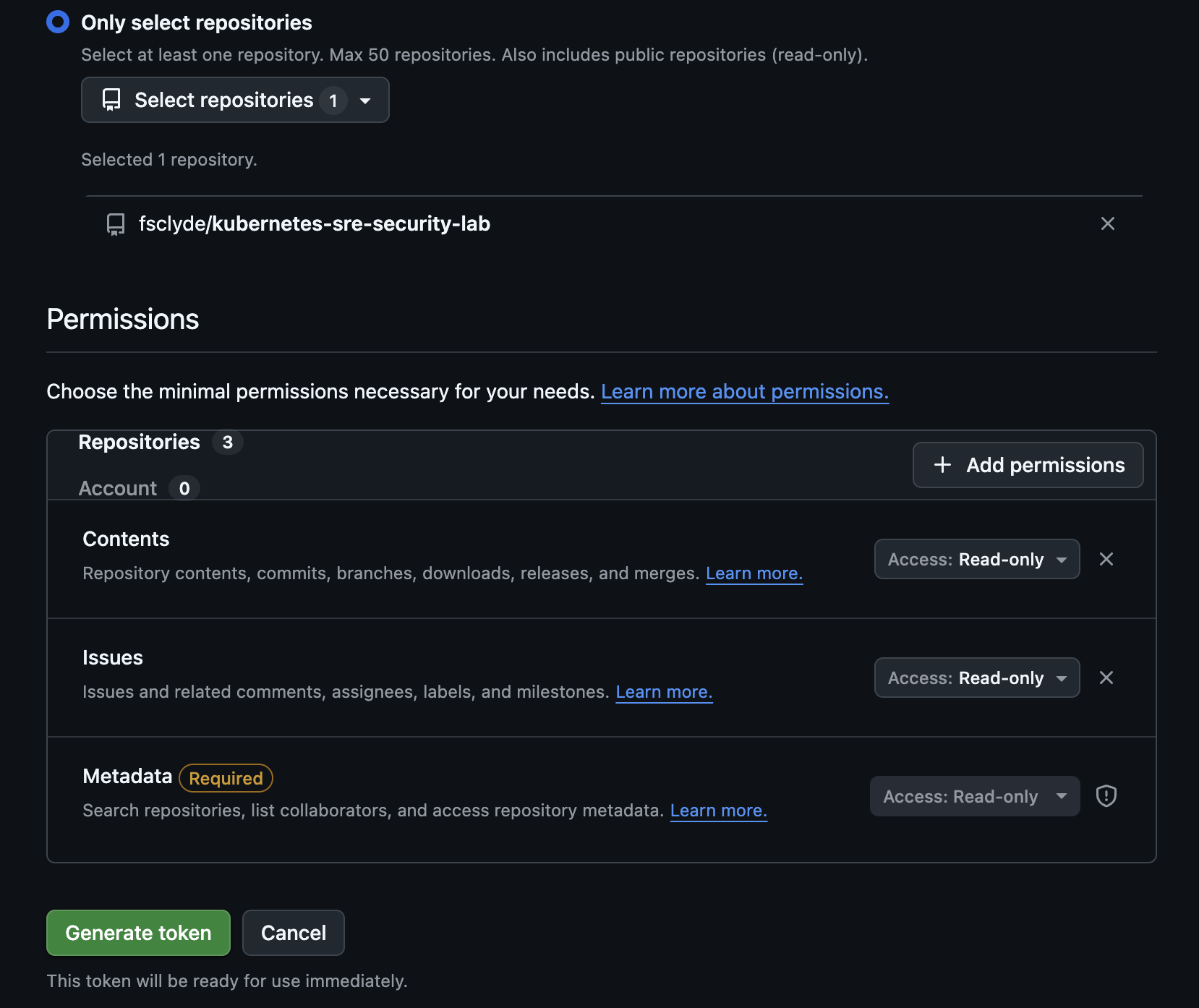
Create a fine-grained GitHub token on the demo repository with **Contents: Read-only** and **Issues: Read-only**, nothing else. You enter it in step 4.
Check: .local/ is ignored by Git, and the realm template defines two clients: holmes and operator.
What I got
Why: The kind cluster turns off its default network plugin so Calico can enforce network policies, and writes a Kubernetes audit log to my laptop. Then I install the Gateway API and agentgateway.
In plain words
- Calico
- The network plugin that enforces network policies: rules that say which pod may talk to which.
- Audit log
- Kubernetes writes one line for every API request: who asked, what they did, on which resource, and the answer.
mkdir -p .local/k8s-audit
cp kind/audit-policy.yaml .local/audit-policy.yaml
kind create cluster --config kind/cluster.yaml --wait 120s
kubectl config use-context kind-agent-security-lab
./scripts/install-calico.shkubectl apply --server-side --force-conflicts \
-f https://github.com/kubernetes-sigs/gateway-api/releases/download/v1.6.2/standard-install.yaml
helm upgrade --install agentgateway-crds oci://cr.agentgateway.dev/charts/agentgateway-crds \
--namespace agentgateway-system --create-namespace --version v1.6.0 --wait --timeout 5m
helm upgrade --install agentgateway oci://cr.agentgateway.dev/charts/agentgateway \
--namespace agentgateway-system --version v1.6.0 --wait --timeout 5m
kubectl apply -f manifests/networking/namespaces.yaml
kubectl apply -f manifests/rbac/demo-roles.yamlCheck: Calico pods are Running, and agentgateway is Running in agentgateway-system.
Why: I split reading and writing into two MCP servers with two ServiceAccounts. Kubernetes then enforces the split even if a gateway rule is wrong.
In plain words
- Two tool servers
- Instead of one tool server that can do everything, I run one that can only read and one that can update Deployments. Each has its own Kubernetes account.
- RBAC
- Role-based access control. A Role lists what is allowed (for example, list pods); a RoleBinding gives that Role to an account in one namespace.
helm upgrade --install k8s-mcp-read oci://ghcr.io/containers/charts/kubernetes-mcp-server \
  --version 0.1.0 --namespace mcp --values manifests/mcp/read-values.yaml --wait --timeout 5m
helm upgrade --install k8s-mcp-write oci://ghcr.io/containers/charts/kubernetes-mcp-server \
  --version 0.1.0 --namespace mcp --values manifests/mcp/write-values.yaml --wait --timeout 5m

for s in k8s-mcp-read k8s-mcp-write; do
  kubectl patch service $s -n mcp --type=json \
    -p='[{"op":"add","path":"/spec/ports/0/appProtocol","value":"agentgateway.dev/mcp"}]'
done./scripts/check-rbac.sh
cat docs/architecture.mdCheck: check-rbac.sh shows the read ServiceAccount can list pods in demo but cannot read Secrets or patch Deployments, and the write ServiceAccount can patch Deployments in demo only.
Why: The bootstrap script asks for the GitHub token and the Anthropic key and stores them in Kubernetes Secrets, never in the agent pods. Then I start Keycloak, the demo app and the GitHub MCP server.
./scripts/bootstrap-secrets.sh
kubectl apply -f manifests/keycloak/keycloak.yaml
kubectl rollout status deployment/keycloak -n identity --timeout=5m

kubectl apply -f manifests/demo/app.yaml
kubectl apply -f manifests/github-mcp/deployment.yaml
kubectl rollout status deployment/demo-web -n demo --timeout=3m
kubectl rollout status deployment/github-mcp -n mcp --timeout=3m
Check: Keycloak, demo-web and github-mcp are Running, and .local/lab-secrets.env exists and is ignored by Git.
Why: This is where identity becomes permission. The tool routes require a Keycloak token, the write route accepts only the operator, the GitHub route allows only a few read tools, and the model route uses a key per agent.
In plain words
- azp
- A field in the Keycloak token that names the client that asked for it:
holmesoroperator. The gateway rules read it. - Two layers
- The gateway decides which tool servers an agent may call. Kubernetes decides what each tool server may do. Both must agree for a change to happen.
kubectl apply -f manifests/agentgateway/routes.yaml
kubectl get gateway,httproute,agentgatewaybackend,agentgatewaypolicy -A# two more terminals, leave running
kubectl port-forward -n agentgateway-system svc/agentgateway-proxy 8080:80
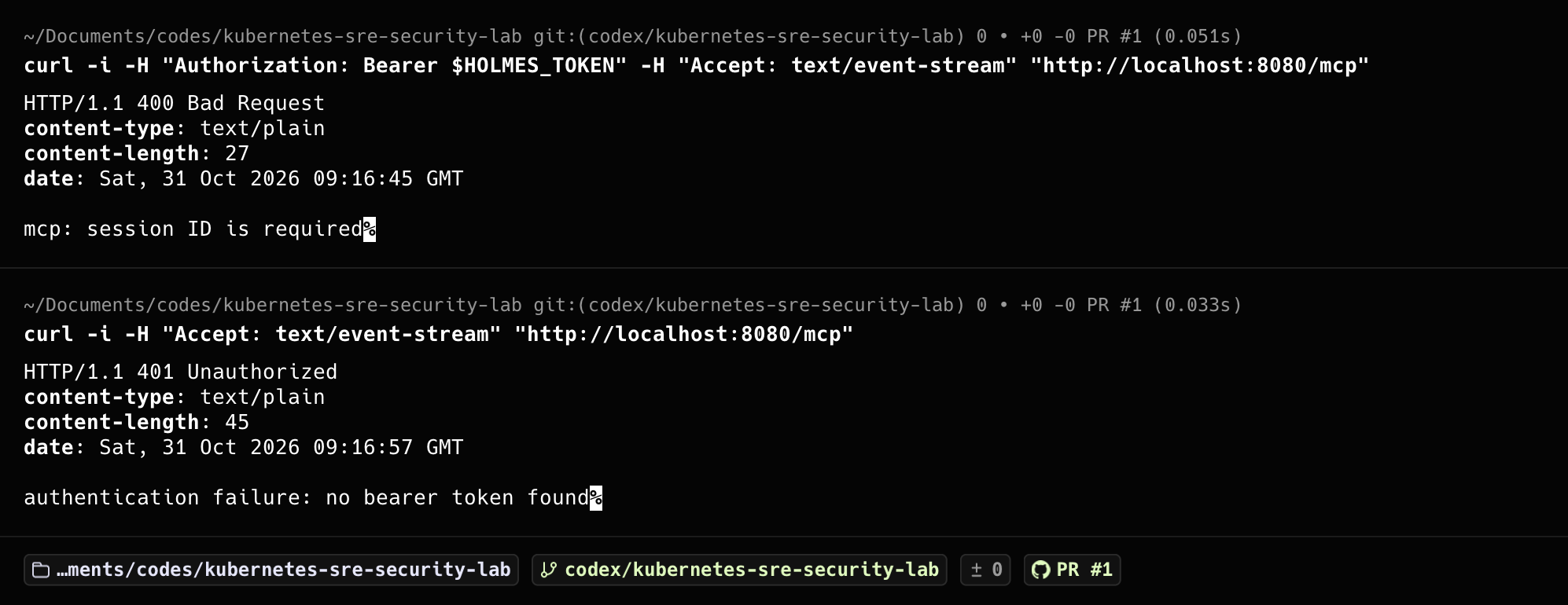
kubectl port-forward -n identity svc/keycloak 8081:8080The tool routes let initialize and tools/list through without a token, because HolmesGPT lists its tools before it has one. Every tool call still needs a valid token.
Check: Four policies are listed, including k8s-write-tool-rbac, whose rule accepts only jwt.azp == 'operator'.
What I got
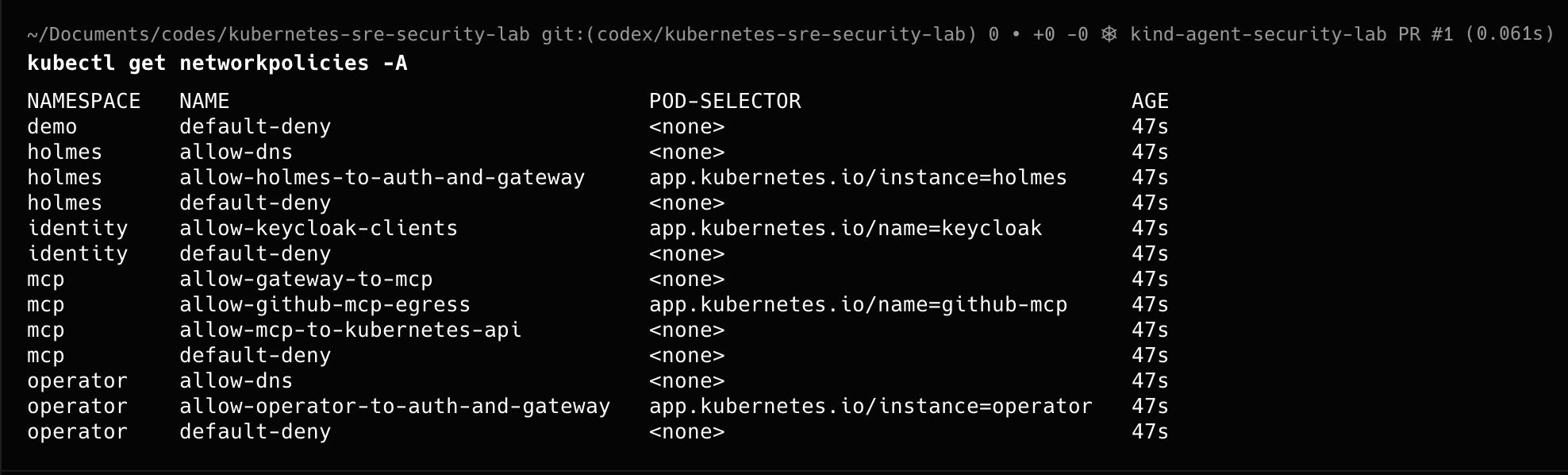
Why: Both agents use the same HolmesGPT chart with different values: different identity, different tools. Their built-in Kubernetes tools and Bash are off, and they run non-root with no extra Linux capabilities.
In plain words
- Restricted Pod Security
- A Kubernetes profile that refuses pods running as root, with extra Linux capabilities, or that can raise their privileges.
- Why turn off built-in tools
- HolmesGPT can talk to Kubernetes on its own. If I left that on, it could skip the gateway and its rules.
helm repo add robusta https://robusta-charts.storage.googleapis.com && helm repo update
helm upgrade --install holmes robusta/holmes --namespace holmes --create-namespace \
  --values manifests/holmes/values.yaml --wait --timeout 10m
helm upgrade --install operator robusta/holmes --namespace operator --create-namespace \
--values manifests/operator/values.yaml --wait --timeout 10mkubectl apply -f manifests/networking/policies.yaml
kubectl get networkpolicy -A
# two more terminals, leave running
kubectl port-forward -n holmes deployment/holmes-holmes 5050:5050
kubectl port-forward -n operator deployment/operator-holmes 5051:5050Check: holmes and operator pods are Running, and their namespaces show pod-security.kubernetes.io/enforce=restricted.
What I got
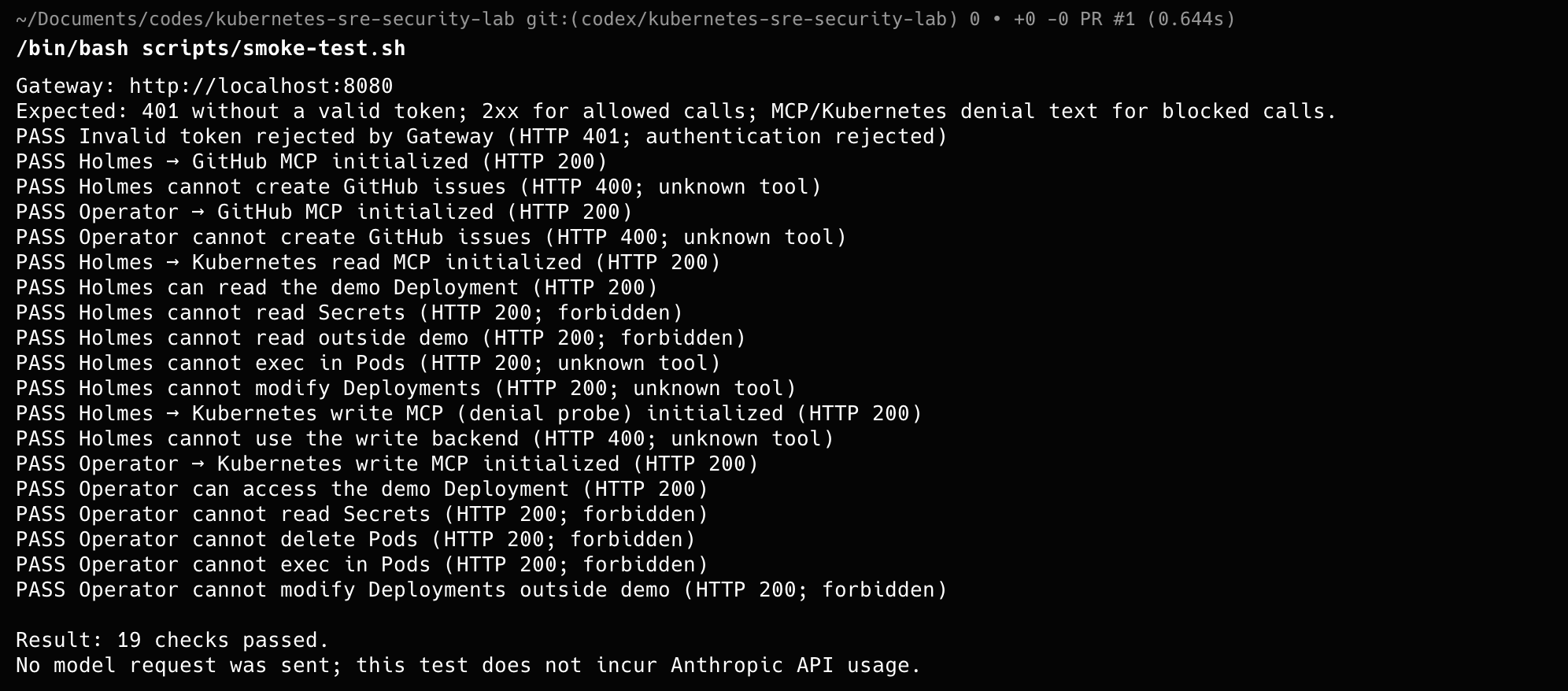
Why: Before the incident, I check the controls: tokens are required, each agent reaches only its own routes, and the agent pods cannot go around the gateway.
/bin/bash scripts/smoke-test.shfor ns in holmes operator; do
pod="$(kubectl get pods -n "$ns" -l app=holmes -o jsonpath='{.items[0].metadata.name}')"
kubectl exec -n "$ns" "$pod" -- python -c '
import socket
for host in ["kubernetes.default.svc.cluster.local", "api.anthropic.com", "api.github.com"]:
try:
socket.create_connection((host, 443), 3).close(); print("UNEXPECTED:", host)
except OSError:
print("Blocked:", host)'
doneThe smoke test does not call the model or change the cluster.
Check: The smoke test passes, and all three direct connections print Blocked for both agents.
What I got
Why: This is the core of the lab. I break the app, HolmesGPT investigates with its own token, I read its answer, and only then do I ask the operator to apply the fix.
In plain words
- Why a human in the middle
- HolmesGPT reads logs and GitHub, which anyone can write to. I read its recommendation before the operator acts, so a hostile instruction cannot go straight to a change.
- Following one action
- The gateway log says the operator called the write tool. The audit log says the write tool server patched the Deployment. Together they tell the story.
kubectl set image deployment/demo-web web=nginx:does-not-exist-lab -n demo
kubectl get deployment,pods -n demosource .local/lab-secrets.env
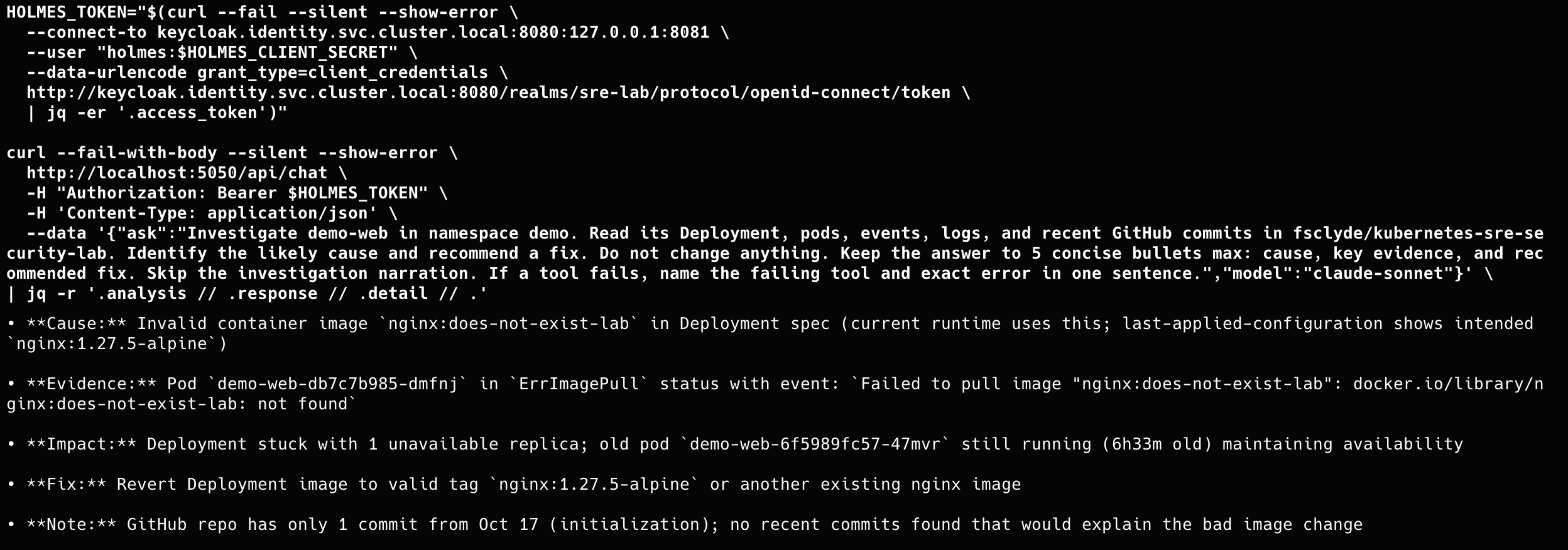
HOLMES_TOKEN="$(curl --fail --silent --show-error \
--connect-to keycloak.identity.svc.cluster.local:8080:127.0.0.1:8081 \
--user "holmes:$HOLMES_CLIENT_SECRET" \
--data-urlencode grant_type=client_credentials \
http://keycloak.identity.svc.cluster.local:8080/realms/sre-lab/protocol/openid-connect/token \
| jq -er '.access_token')"
curl --fail-with-body --silent --show-error http://localhost:5050/api/chat \
-H "Authorization: Bearer $HOLMES_TOKEN" -H 'Content-Type: application/json' \
--data '{"ask":"Investigate demo-web in namespace demo. Read its Deployment, pods, events, logs, and recent GitHub commits in fsclyde/kubernetes-sre-security-lab. Identify the likely cause and recommend a fix. Do not change anything.","model":"claude-sonnet"}' \
| jq -r '.analysis // .response // .detail // .'source .local/lab-secrets.env
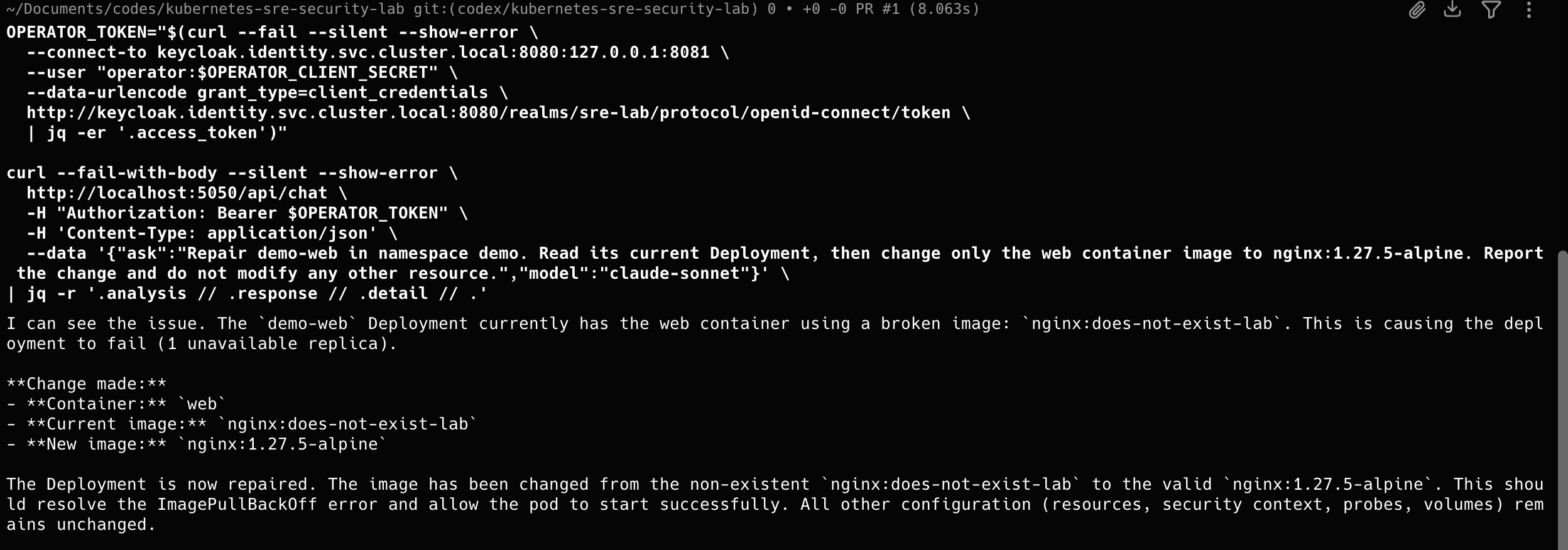
OPERATOR_TOKEN="$(curl --fail --silent --show-error \
--connect-to keycloak.identity.svc.cluster.local:8080:127.0.0.1:8081 \
--user "operator:$OPERATOR_CLIENT_SECRET" \
--data-urlencode grant_type=client_credentials \
http://keycloak.identity.svc.cluster.local:8080/realms/sre-lab/protocol/openid-connect/token \
| jq -er '.access_token')"
curl --fail-with-body --silent --show-error http://localhost:5051/api/chat \
-H "Authorization: Bearer $OPERATOR_TOKEN" -H 'Content-Type: application/json' \
--data '{"ask":"Repair demo-web in namespace demo. Change only the web container image to nginx:1.27.5-alpine. Do not modify any other resource.","model":"claude-sonnet"}' \
| jq -r '.analysis // .response // .detail // .'kubectl rollout status deployment/demo-web -n demo --timeout=3m
kubectl logs -n agentgateway-system deployment/agentgateway-proxy --since=30m | grep -E 'http.path=/mcp|http.path=/v1/messages'
jq -r 'select(.user.username | startswith("system:serviceaccount:mcp:")) | [.requestReceivedTimestamp, .user.username, .verb, .objectRef.resource, .objectRef.name, .responseStatus.code] | @tsv' .local/k8s-audit/audit.logCheck: HolmesGPT names the invalid image and changes nothing. After the operator runs, the image is nginx:1.27.5-alpine, the gateway log shows the operator calling the write tool, and the audit log shows the k8s-mcp-write ServiceAccount patching the Deployment.
What I got
Why: The gateway log and the audit log show requests. Falco shows what actually ran inside the agent, tool server and gateway pods.
In plain words
- Falco
- A runtime security tool. It watches system calls, the requests a program makes to the operating system, such as opening a file or a network connection.
helm repo add falcosecurity https://falcosecurity.github.io/charts && helm repo update
helm upgrade --install falco falcosecurity/falco --namespace falco --create-namespace \
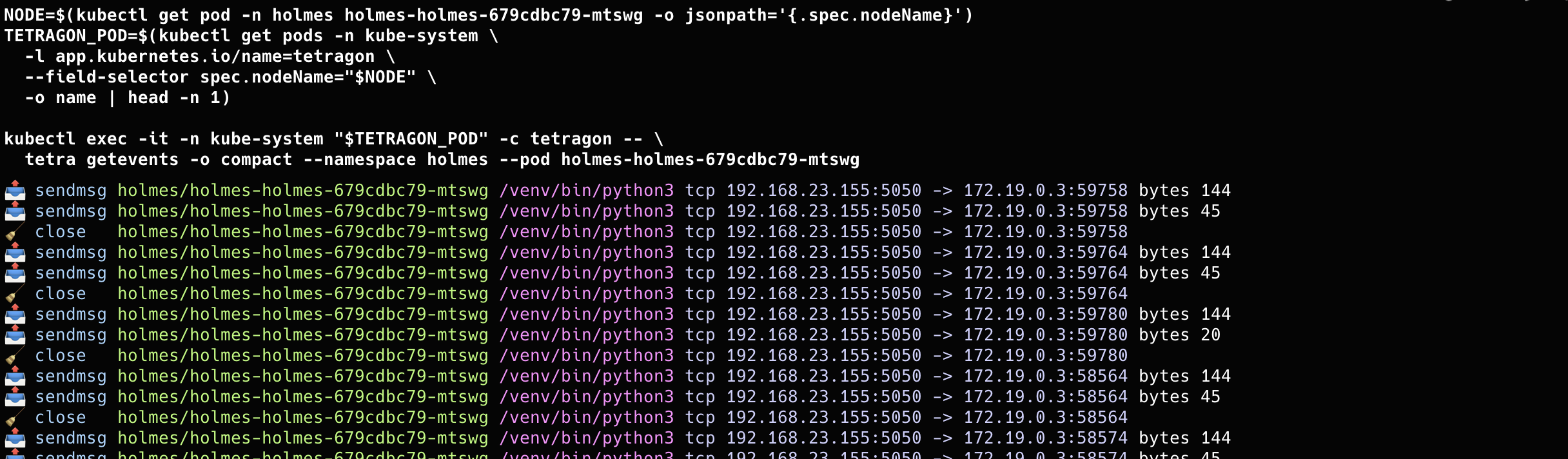
--version 9.1.0 --values manifests/falco/values.yaml --wait --timeout 10mAGENT_POD="$(kubectl get pods -n holmes -l app=holmes -o jsonpath='{.items[0].metadata.name}')"
kubectl exec -n holmes "$AGENT_POD" -- /venv/bin/python3 -c 'import os; os.stat("/etc/hostname")'
kubectl logs -n falco -l app.kubernetes.io/name=falco --all-containers=true --since=2m \
| jq -Rr 'fromjson? | select(.rule == "Agent container syscall activity") | [.time // "", .output] | @tsv'Collecting every system call produces a lot of logs. Check the Falco logs for dropped events.
Check: Falco prints events for the holmes namespace with the pod, the process and the system call.
What I got
Why: My scenario: the operator agent is compromised. I disable its client in Keycloak and check that HolmesGPT keeps working.
# Keycloak admin console: http://localhost:8081 , realm sre-lab
# Clients > operator > turn "Enabled" off, then:
source .local/lab-secrets.env
OPERATOR_TOKEN="$(curl --fail --silent --show-error \
  --connect-to keycloak.identity.svc.cluster.local:8080:127.0.0.1:8081 \
  --user "operator:$OPERATOR_CLIENT_SECRET" \
  --data-urlencode grant_type=client_credentials \
  http://keycloak.identity.svc.cluster.local:8080/realms/sre-lab/protocol/openid-connect/token \
  | jq -er '.access_token')"   # fails: client disabled
A token issued before the change stays valid until it expires (5 minutes in this lab). Measure it on your run.
Check: No new operator token is issued, and a HolmesGPT investigation still works.
Why: I delete everything and rebuild from the repository with fresh secrets, then run the checks and the incident again.
kind delete cluster --name agent-security-lab
rm -rf .local   # old credentials and audit logs
# then repeat steps 2 to 8
Check: The checks pass again with new credentials. The rebuild time is your recovery time.
reading
Further reading
- HolmesGPT documentationholmesgpt.dev/
- agentgateway JWT with Keycloakagentgateway.dev/docs/kubernetes/latest/documentation/security/jwt/setup/
- Kubernetes MCP servergithub.com/containers/kubernetes-mcp-server
- Kubernetes RBACkubernetes.io/docs/reference/access-authn-authz/rbac/
- Falcofalco.org/docs/
- OWASP Top 10 for LLM applicationsgenai.owasp.org/llm-top-10/