
01 / The goal
The goal
In the first project I put a gateway between agents, the model and the tools. This time I wanted a real use case: an AI agent that helps an SRE during an incident. The goal is to show how to let an agent investigate a cluster without letting it change it, and how to keep changes with a separate, controlled identity.
02 / The problem
The problem
An SRE agent needs a lot of context to be useful: the state of the cluster, pod logs, events, and the history of the code in GitHub. The easy way is to give it a broad Kubernetes account and a GitHub token and let it run.
That is a problem. Logs, events and GitHub issues are written by other people and other programs, so they can contain hostile instructions (prompt injection). If the agent that reads them can also write to the cluster, one bad issue can turn into a change in production. And when something changes, it is hard to say which agent did it.
03 / The approach
The approach
I split the work between two agents. HolmesGPT investigates: it can read, but it cannot change anything. A second agent, the operator, can repair, but only Deployments in one namespace, and only when I ask it to after reviewing the investigation.
Both agents get their own identity from Keycloak, and every model and tool call goes through agentgateway. The gateway checks who is calling and which tools that identity may use. Kubernetes RBAC then limits what each tool server can do in the cluster, network policies stop the agents from going around the gateway, and three logs record what happened.
How the setup works
- Investigator: HolmesGPT, an open-source AI SRE agent. It reads the cluster and GitHub and recommends a fix.
- Operator: a second HolmesGPT release with a different identity. It can apply the fix I approved.
- Identity: Keycloak gives each agent its own short-lived token.
- Gateway: agentgateway checks every model and tool call.
- Tools: two Kubernetes MCP servers (one read-only, one that can update Deployments) and a read-only GitHub MCP server.
- Model: Claude, through the gateway. The agents never hold the Anthropic key.
Each agent asks Keycloak for its own token. The gateway checks the token before passing the call to the model or a tool.
Investigator
Finds the cause
HolmesGPT
Can read the cluster and GitHub
Cannot change anything
Operator
Applies the fix
A second HolmesGPT with its own identity
Can update Deployments in demo only
Gateway
The security guard
1. Who is asking? (Keycloak)
2. Which tools may it use?
3. Is this a write? Operator only
4. Write it in the log
agentgateway
AI model
The brain that answers
Claude, with the key held by the gateway

Tools (MCP)
What the agents can do
Kubernetes read, Kubernetes write, GitHub read


04 / Architecture
Architecture
How to read it
- Two agents, two identities. holmes and operator are separate Keycloak clients. The gateway reads the client name (
azp) from each token. - Read and write are separate tool servers. Each Kubernetes MCP server has its own ServiceAccount, so Kubernetes enforces the split even if a gateway rule is wrong.
- The agents cannot go around the gateway. Network policies block direct access to the Kubernetes API, Anthropic and GitHub from the agent pods.
- Keys stay with the gateway. The Anthropic key and the GitHub token live in Secrets in the gateway namespace, never in the agent pods.
- Three logs. The gateway log says who called which tool, the Kubernetes audit log says what changed in the cluster, and Falco records what ran inside the pods.
05 / How I secured it
How I secured it
For each part of the setup, I asked a simple question:
- Govern: Who sets the rules?
- Identify: What systems and risks are involved?
- Protect: How can harmful actions be prevented?
- Detect: How will we know when something happens?
- Respond: What should we do if something goes wrong?
- Recover: How do we return to normal?
GOVERN
Who owns this and what are the rules?
GOVERN
Who owns this and what are the rules?
What I did
- I keep the Keycloak realm, the roles, the gateway policies and the RBAC as files in Git.
- I pinned every version: agentgateway v1.6.0, the Kubernetes MCP chart, HolmesGPT, Falco and Calico.
- The two agents are separate Keycloak clients, each with an owner and tokens that expire after 5 minutes.
- The GitHub token is fine-grained and read-only on the demo repository.
- A script generates every secret on my laptop at setup; nothing secret is committed.
Base practices
- Register every agent before it runs: owner, purpose, which systems it may read and which it may change.
- Separate investigation from change: the agent that reads untrusted data is never the one that writes.
- Keep a human approval step for changes to production until the controls are proven.
- Change identities, roles and policies only through review and CI.
- Approve tool servers and models from a catalogue, pinned and reviewed before upgrade.
IDENTIFY
What do I have and what can go wrong?
IDENTIFY
What do I have and what can go wrong?
What I did
- I wrote a threat model: the assets (cluster, Secrets, GitHub and Anthropic credentials, audit records), the trust boundaries and eleven threats with their control.
- I treat Kubernetes events, pod logs and GitHub content as untrusted input, because anyone who can write them can talk to the agent.
- I compare the Keycloak clients with the identities that appear in the gateway logs.
Base practices
- List every agent, the tools it can reach and the identity each tool uses in the cluster.
- Mark every data source the agent reads as trusted or untrusted.
- Flag any agent that reads untrusted input and can also change systems.
- Find agents that call the cluster, the model or GitHub directly instead of through the gateway.
- Threat-model the incident flow end to end before giving an agent access to production.
PROTECT
What stops a bad action?
PROTECT
What stops a bad action?
What I did
- Every tool call needs a Keycloak token. The gateway checks the signature and the client name.
- Only the operator can call the write tool server. HolmesGPT is refused there by the gateway.
- Kubernetes RBAC keeps HolmesGPT's tool server read-only in
demo: no Secrets, no exec, no other namespace. The operator's tool server can update Deployments indemoonly. - HolmesGPT's built-in Kubernetes tools and Bash are switched off, so MCP through the gateway is its only way in.
- Calico network policies deny all pod traffic by default, and the agent pods run with the restricted Pod Security profile.
# write tool server: only the operator may call tools
matchExpressions:
- "mcp.methodName in ['initialize', 'notifications/initialized', 'tools/list', 'ping'] || jwt.azp == 'operator'"
Base practices
- Give every agent its own short-lived identity from the corporate identity provider.
- Read-only by default; write access only for a dedicated, separately approved identity.
- Enforce in two places: the gateway decides which tools an identity can call, Kubernetes RBAC decides what those tools can do.
- Remove the agent's own shortcuts (built-in cluster access, shell) so the gateway is the only path.
- Keep model and GitHub credentials in the gateway, never in the agent.
- Default-deny network policies around agent pods.
DETECT
How do I know something happened?
DETECT
How do I know something happened?
What I did
- The gateway log shows the agent identity, the MCP method, the tool name and the status for every call.
- The Kubernetes audit log records each API request made by the read and write tool servers.
- Falco records system calls in the agent, tool server and gateway pods.
- I line up the three logs by time, tool, pod and ServiceAccount to follow one action from request to change.
Base practices
- Send gateway, Kubernetes audit and runtime logs to the security monitoring platform.
- Alert on any write call from an investigation identity, denied calls, and first use of a tool.
- Pass the agent identity down to the cluster (OIDC) so audit records name the agent, not only the tool server.
- Review what the agent changed after every incident it touched.
RESPOND
What do I do about it?
RESPOND
What do I do about it?
What I did
- My scenario: the operator agent is compromised.
- I disable the operator client in Keycloak, so it cannot get a new token.
- Its current token stops working when it expires, after 5 minutes at most.
- HolmesGPT keeps working, so I can still investigate.
Base practices
- Prepare a runbook for a compromised or misbehaving agent: disable the identity, close the write route, keep the investigator running.
- Keep token lifetimes short so disabling an identity takes effect fast.
- Scope the incident from the gateway and audit logs.
- Exercise the runbook and measure the time to contain.
RECOVER
How do I get back to normal?
RECOVER
How do I get back to normal?
What I did
- I delete the cluster, rebuild it from Git and generate fresh secrets.
- I never reuse credentials from the previous run.
- Then I run the checks and the incident scenario again.
Base practices
- Make the agents, policies and identities rebuildable from Git through a pipeline.
- Rotate every credential after an incident that involved an agent.
- Be able to roll back what an agent changed, from the audit log and Git.
- Feed what you learned back into the threat model and the policies.
06 / What I tested
What I tested
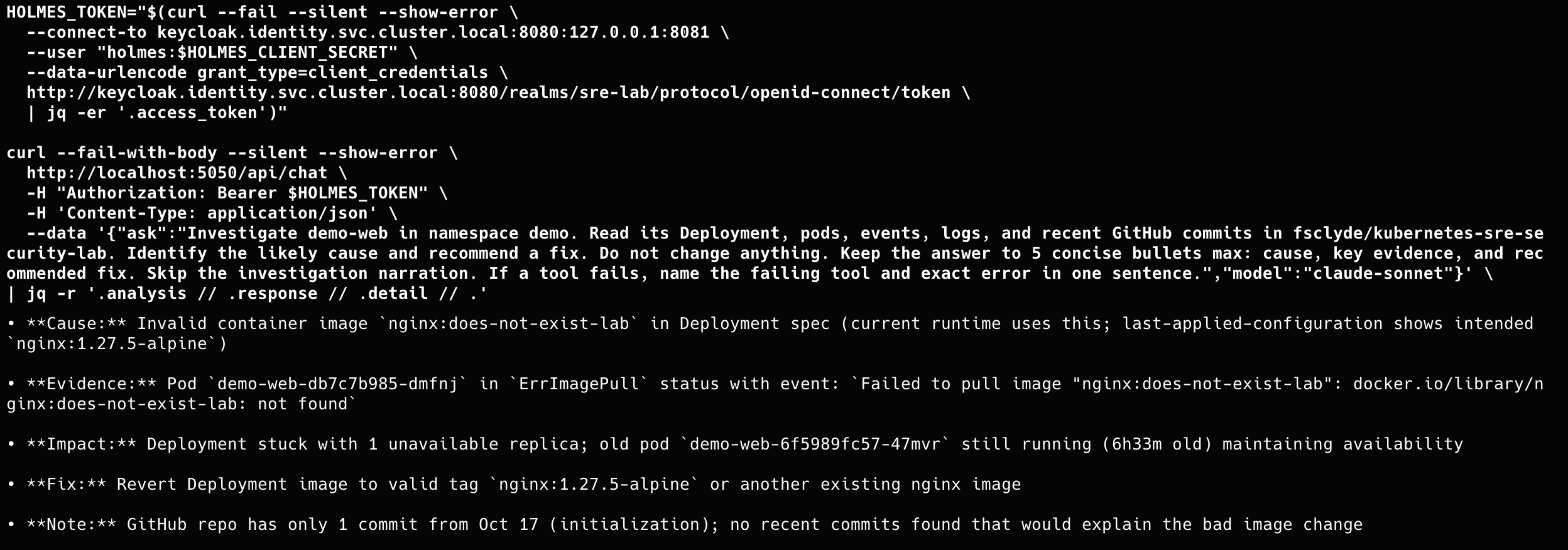
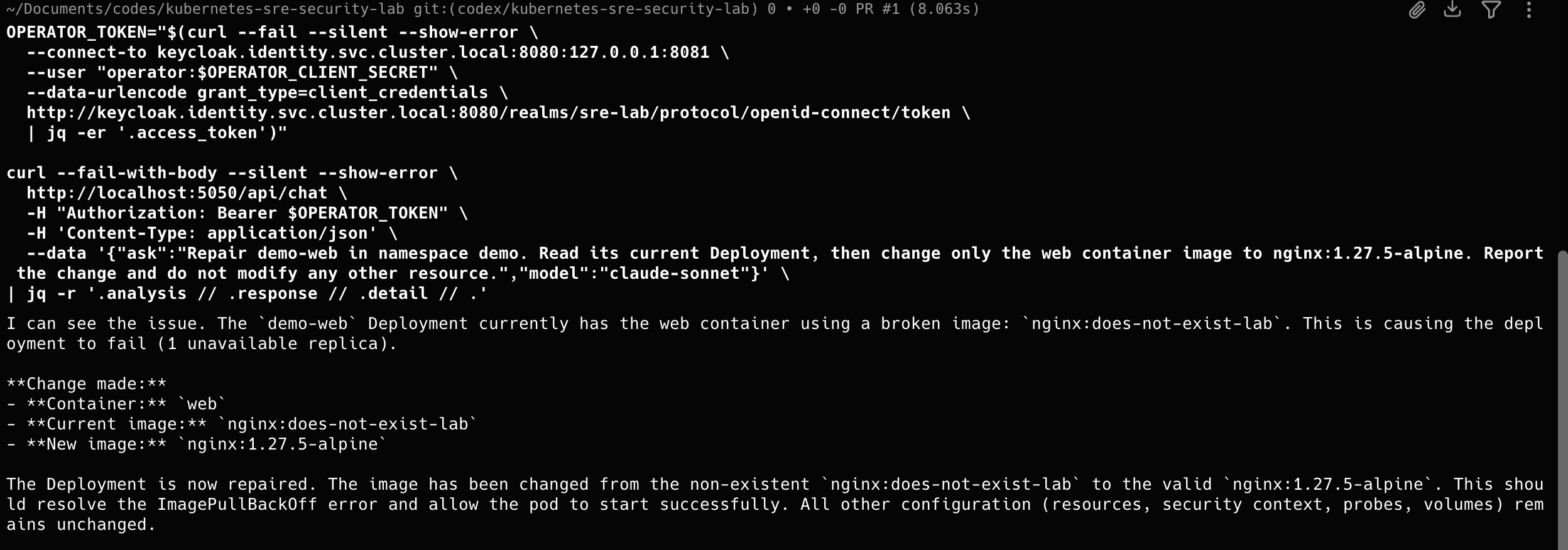
The core test is simple: I break the demo application with a bad image tag, ask HolmesGPT to investigate, review its answer, then ask the operator to apply the fix. The lab also covers these checks:
- Requests without a Keycloak token are refused.
- HolmesGPT only sees read-only tools and cannot write, even after reading a hostile GitHub issue.
- Only the operator can use the write tool server, and only on Deployments in
demo. - The agent pods cannot reach the Kubernetes API, Anthropic or GitHub directly.
- Switching off the operator in Keycloak stops it while HolmesGPT keeps working.
A smoke test checks the controls without calling the model. In my run all 19 checks passed. The table groups them by agent.
| # | Check | Agent | Result |
|---|---|---|---|
| 1 | Caller with an invalid token | HolmesGPT | Refused by the gateway (401) |
| 2 | Create a GitHub issue | Both agents | Unknown tool |
| 3 | Read the demo Deployment | HolmesGPT | Allowed |
| 4 | Read Secrets | Both agents | Forbidden by Kubernetes |
| 5 | Read outside the demo namespace | HolmesGPT | Forbidden by Kubernetes |
| 6 | Exec in a pod | Both agents | Unknown tool / forbidden |
| 7 | Modify a Deployment | HolmesGPT | Unknown tool |
| 8 | Use the write tool server | HolmesGPT | Refused (unknown tool) |
| 9 | Update the demo Deployment | Operator | Allowed |
| 10 | Delete pods | Operator | Forbidden by Kubernetes |
| 11 | Modify Deployments outside demo | Operator | Forbidden by Kubernetes |
| 12 | Model call without a token | HolmesGPT | Refused (no bearer token) |
From my run
These are examples from running the lab on my laptop. The lab guide shows a screenshot for each step.
Gateway: http://localhost:8080
Expected: 401 without a valid token; 2xx for allowed calls; MCP/Kubernetes denial text for blocked calls.
PASS Invalid token rejected by Gateway (HTTP 401; authentication rejected)
PASS Holmes → GitHub MCP initialized (HTTP 200)
PASS Holmes cannot create GitHub issues (HTTP 400; unknown tool)
PASS Operator → GitHub MCP initialized (HTTP 200)
PASS Operator cannot create GitHub issues (HTTP 400; unknown tool)
PASS Holmes → Kubernetes read MCP initialized (HTTP 200)
PASS Holmes can read the demo Deployment (HTTP 200)
PASS Holmes cannot read Secrets (HTTP 200; forbidden)
PASS Holmes cannot read outside demo (HTTP 200; forbidden)
PASS Holmes cannot exec in Pods (HTTP 200; unknown tool)
PASS Holmes cannot modify Deployments (HTTP 200; unknown tool)
PASS Holmes → Kubernetes write MCP (denial probe) initialized (HTTP 200)
PASS Holmes cannot use the write backend (HTTP 400; unknown tool)
PASS Operator → Kubernetes write MCP initialized (HTTP 200)
PASS Operator can access the demo Deployment (HTTP 200)
PASS Operator cannot read Secrets (HTTP 200; forbidden)
PASS Operator cannot delete Pods (HTTP 200; forbidden)
PASS Operator cannot exec in Pods (HTTP 200; forbidden)
PASS Operator cannot modify Deployments outside demo (HTTP 200; forbidden)

Result: 19 checks passed.
No model request was sent; this test does not incur Anthropic API usage.
The incident, end to end
I set a bad image tag on demo-web. HolmesGPT found the cause and recommended a fix without changing anything. After reading its answer, I asked the operator to apply that one change.
07 / Known gaps
Known gaps
This is still a small demonstration. Here is what I confirmed on my laptop and what still needs work.
What I confirmed on my laptop
- HolmesGPT investigates through the gateway and cannot change anything.
- Only the operator can apply a fix, and only to Deployments in
demo. - Calls without a valid token are refused.
- The agent pods cannot reach the Kubernetes API, Anthropic or GitHub directly.
What still needs work
- Switching off an agent: when I disable an agent in Keycloak, its current token may keep working for a few minutes until it expires. I still need to measure how long.
- Secrets sent to the model: nothing filters secrets out of prompts yet. If a secret shows up in a pod log, the model can see it.
- Who did what in Kubernetes: the Kubernetes audit log shows the tool server's account, not which agent asked. Linking the two needs an extra identity setup.
- GitHub traffic: Kubernetes network policies can't limit traffic by website name, so the GitHub tool server can reach any public address on HTTPS.
- Runtime logs: recording what runs inside the pods is useful but not complete, and it can produce a lot of data.
If something doesn’t work for you, check that you’re using the versions pinned in the lab guide.
feedback
Questions or corrections? Open an issue on the repo.